
In short
The signal that matters
- Workflows chaos is rarely just a software problem. It is usually a sign that your business has outgrown workarounds, founder-held decisions, unclear ownership, or disconnected systems.
- An AI-ready business starts with architecture, not automation. You need to decide how the work should work before choosing tools or automating the workflow.
- The architecture has three layers: the leader, the business, and the systems. Your decisions shape strategy and process, while the systems layer turns that clarity into trusted data, clear ownership, and reliable execution.
- AI-first does not mean forcing AI into every workflow. AI can improve how the business analyzes, designs, builds, automates, and operates, while human judgment remains where it matters.
- Client usecase: How a company moved from 24 disconnected tools to 5 connected tools, made Monday the central hub, used vibe coding and multiple AI models in the building process, and achieved 30% growth over 12 months.
What if the real problem is not that your business lacks automation, but that nobody has properly decided how the work should work?
This is where many growing businesses get stuck. You have Excel files. Google Sheets. A CRM. Project software. Payment tools. Forms. Email platforms. Maybe a dashboard. Maybe a few automations layered in over time. On paper, it looks modern enough. In practice, people are still copying information from one place to another, rebuilding the same report every Monday, checking three systems to answer one client question, and carrying important handoffs in Slack messages, inboxes, or memory.
At that point, it is easy to assume the answer is another tool. A better CRM. A new reporting platform. A proper integration. An AI assistant. Something that will finally remove the friction. Sometimes new software is part of the answer. Usually, it is not the first answer.
What I do instead is help businesses decide how they should work before deciding what to automate. That means connecting strategy, workflows, data, systems, automation, AI, and implementation in the right order. The decision starts with the leader, because the person running the business chooses what gets standardized, delegated, and measured, and everything below follows from that. I work across three layers: the leader, the business, and the systems.
Before I automate anything, the practical diagnostic work happens inside the business layer and the systems layer, covering strategy, process, data, systems, and automation. The leader layer sits above and shapes all of it. If you skip that order, you rarely get leverage. You get more moving parts.
This matters because most businesses do not actually have a software problem. They have a design problem. The business has grown. The old workarounds have survived longer than they should have. The founder still carries decisions that no longer belong with them. The team is adapting around unclear ownership. The systems reflect all of it.
That is why I do not begin with automation. I begin with the three layers: the leader, the business, and the systems. Within the business layer I look at strategy and process. Within the systems layer I look at data, systems, and automation or AI. Each layer shapes the next. When these layers are clear, automation becomes useful. When they are not, automation usually speeds up confusion.
This article is an evergreen guide to that sequence. It is designed to help you diagnose what is actually breaking down beneath spreadsheet chaos, disconnected systems, and premature AI projects, and to give you a practical method you can use before buying another tool.
Why businesses misdiagnose this as a software problem
Most operational pain shows up in software, so businesses blame software first. A report is late, so the dashboard must be wrong. Leads are slipping, so the CRM must be weak. Delivery feels messy, so the project platform must be outdated. The team keeps exporting data into Google Sheets, so maybe the fix is a better integration stack.
Sometimes that is true. Often it is a downstream symptom.
If your sales stages are unclear, no CRM will forecast cleanly. If onboarding varies depending on who sold the work, automation will not create a reliable handoff. If reporting pulls from five spreadsheets, two exports, and one half-maintained CRM, the dashboard is not the root problem. I see this repeatedly in growing businesses that have outgrown memory, workarounds, and founder oversight, but have not yet rebuilt the operating model underneath them.
They look like tool problems. They rarely start there.
The three layers I work on before automation
My positioning is simple. I help businesses decide how they should work before deciding what to automate. That means I connect business strategy, workflow design, data, technology, automation, AI strategy, and implementation in the right order.
The visible symptoms are usually operational. The CRM is messy. Handoffs are inconsistent. Reporting is late. Excel has become a second operating system. AI sounds promising, but nobody is sure what it should do or whether the information behind it can be trusted.
So I start with the business layer, then the systems layer, in sequence. Strategy and process live in the business layer. Data, systems, and automation live in the systems layer. Above both sits the leader whose clarity shapes everything underneath. Three layers. Everything else is detail inside them.
The leader layer: the decisions that shape everything below
This is where the work starts. The leader decides what gets standardized, delegated, and measured. If those decisions are unresolved, the business layer absorbs the uncertainty and the systems layer reflects it. What looks like spreadsheet chaos later is often a decision problem first.
The business layer: strategy and process
Strategy: what should the business be optimized for?
Before I touch systems, I need to know what the business is actually trying to support.
Businesses often ask for automation when what they really want is a very specific outcome: faster lead response, less founder involvement in delivery, clearer forecasting, smoother onboarding, or reporting that can be trusted without a Monday-morning rebuild. Those are different problems. They require different process choices, data structures, and systems decisions.
If the strategy is vague, operations become vague with it. The CRM fills up with activity but not meaning. The team stays busy without being aligned. Reports measure motion instead of progress.
This is also where the Three-Layer perspective matters. Strategy is a leader decision. The founder's clarity shapes business strategy, and business strategy shapes systems. If the leader has not decided what should be standardized, delegated, or measured, the operating model absorbs that uncertainty.
So before automating anything, I ask one question first: what outcome must this part of the business reliably produce?
For sales, that might be qualified opportunities moving through defined stages. For onboarding, it might be a client moving from signed agreement to first delivery milestone without dropped context. For reporting, it might be a weekly view of pipeline, cash, delivery capacity, and risk that can be trusted.
Until that outcome is clear, automation has no direction.
Process: what actually happens, not what you assume happens?
Once the outcome is clear, I map the actual workflow.
Not the polished process diagram. The real one. What happens when a lead comes in, a deal closes, a client needs onboarding, or leadership wants a report by 4 p.m.
A common example is the sales-to-delivery handoff. On paper, it sounds clean: proposal accepted, payment received, agreement signed, CRM updated, project created, team notified, onboarding email sent, kickoff scheduled. In reality, the CRM gets updated late, payment is checked manually, key details sit in email, the delivery team gets partial context in a message thread, and someone senior still watches the whole thing to make sure nothing breaks.
That is not one workflow. It is a collection of manual saves.
Before I recommend automation, I identify the trigger, the major steps, the owner, the handoff points, the expected result, and the exceptions. Then I look for duplicated actions, unclear ownership, and steps that only work because one person keeps compensating for the gaps.
A useful process is not the most elaborate one. It is one where people know what should happen next, what information they need, and who owns the result.
The systems layer: data, systems, automation, and AI
Data: can the business trust the information it is using?
This is the layer businesses underestimate most.
Excel and Google Sheets are not the enemy. The problem starts when spreadsheets become the unofficial operating layer beneath the official systems. One sheet tracks leads because the CRM is not trusted. Another tracks onboarding because the project tool is inconsistent. Another rebuilds reporting because the dashboard cannot be relied on.
That is how parallel realities appear.
Client names get entered three different ways. Dates use mixed formats. Owner fields are blank. Pipeline stages mean different things to different people. Reports depend on one person knowing which columns to clean before the numbers make sense.
At that point, AI is only as good as the data it receives. A lead-qualification workflow can read enquiries, summarize them, and suggest next steps, but not if the qualification criteria are vague, the CRM fields are inconsistent, and the handoff after qualification is undefined.
Before I automate, I look for basic data integrity:
- one source of truth for each critical type of information
- consistent naming conventions and field definitions
- clear ownership for updates and maintenance
- a workable standard for duplicates, exceptions, and missing values
This layer is not glamorous. It is usually why reporting feels heavier than it should and why AI experiments disappoint.
Systems: which tool should own which part of the work?
Only after strategy, process, and data are clear do I redesign the systems layer.
This does not always mean replacing the stack. Often the better move is to simplify it. Use the CRM properly. Stop tracking delivery in two places. Move one fragile spreadsheet into a more durable workflow. Decide where tasks live, where relationship history lives, where billing lives, and where reporting is assembled.
The key question is not, “what is the best software?” It is, “which system should own which part of the work?”
A CRM should usually own the relationship record, pipeline status, and sales information. A project or operations tool should own delivery execution. A finance platform should own billing. Reporting should pull from those systems without forcing a weekly manual rebuild.
When this is unclear, teams create shadow systems. They export the CRM into Google Sheets, build a separate onboarding tracker, or keep personal spreadsheets because the official view cannot be trusted. Those workarounds are understandable. They are also expensive.
This is where implementation matters. Good systems design is not just software selection. It is field structure, workflow ownership, stage definitions, permissions, triggers, and reporting views that the team can actually use consistently.
The right system is rarely the one with the most features. It is the one that can reliably hold the work the business has already clarified.
Automation and AI: what should happen without manual effort, and what still needs human judgment?
This is where automation becomes useful.
Traditional automation is best for clear, repeatable rules. When a form is submitted, create a CRM record. When payment is confirmed, trigger onboarding. When a task is completed, notify the next owner. When the reporting cycle closes, assemble the relevant metrics.
AI is useful where the work involves interpretation. It can read an inbound enquiry and create a structured CRM summary, turn meeting notes into action items, classify requests by urgency, draft follow-up messages from approved context, or review reporting changes and flag anomalies for human review.
What it should not do is invent the operating logic of the business. I still need clear qualification criteria, clear approval points, clear data boundaries, and a clear definition of where human judgment stays in the loop.
AI-first is a way of approaching the work, not a requirement that AI appear in every solution. AI can change how I analyze, design, build, automate, and operate, and the right outcome may still be a conventional workflow, a system built with AI's help, or no AI at all in that particular spot.
The best AI workflows are rarely the flashiest. They remove repetitive preparation, improve visibility, and return cleaner information to the people making decisions.
That is what an AI-ready business means. Not a business that has bought AI tools, but one where the underlying work is clear enough for automation and AI to be trusted.
A practical pre-automation diagnostic you can use now
If you want a practical starting point, do not begin by reviewing your entire tech stack. Choose one recurring workflow that is important enough to matter and common enough to reveal the pattern. Good candidates include lead capture and follow-up, sales-to-delivery handoff, client onboarding, weekly reporting, invoicing and collections, or task assignment across teams.
Then work through the following diagnostic.
Part 1: define the workflow in plain language
Write a one-sentence description of the workflow.
- What starts it?
- What finished result should it produce?
- How often does it happen?
- Who is affected when it goes wrong?
If the finished result is vague, stop there. The workflow is not ready for automation yet.
Part 2: map the current path of work
For the workflow you chose, list:
- the trigger
- each major step
- the person or role currently responsible
- the system used at each step
- where information is copied, re-entered, exported, or reformatted
- where approvals happen
- where exceptions tend to appear
- what people do manually to compensate when the system falls short
Part 3: test for layer problems
Ask these questions in order.
Strategy
- What business outcome is this workflow meant to support?
- Is that outcome defined clearly enough to optimize for?
- Has leadership agreed on what “good” looks like here?
Process
- Are the steps consistent, or does the path change by person or circumstance?
- Are there unnecessary approvals or duplicated actions?
- Is ownership clear at each handoff?
Data
- What information does the workflow depend on?
- Where is that information created first?
- Is there one source of truth, or several partial versions?
- Are key fields defined consistently?
Systems
- Which platform should own each part of the workflow?
- Are people using shadow spreadsheets because the main system is weak or unclear?
- Are two systems trying to do the same job?
Automation and AI
- Which steps are rules-based and repetitive?
- Which steps require interpretation?
- Which decisions still need a human?
- What could go wrong if this ran automatically at scale?
If you cannot answer these questions quickly, that is not failure. It is the diagnosis.
Part 4: score the workflow before automating it
Use a simple 1 to 5 score for each category below.
- Frequency: How often does this workflow happen?
- Friction: How much manual effort, delay, or annoyance does it create?
- Impact: If improved, how meaningfully would it affect revenue, capacity, service quality, or visibility?
- Clarity: How clearly defined is the desired process today?
- Data readiness: How trustworthy is the information behind it?
- Risk: If automated badly, how costly would the consequences be?
Then calculate two quick numbers:
Opportunity Score = Frequency + Friction + Impact
Readiness Score = Clarity + Data readiness
Use them together, not separately.
- High opportunity and high readiness means automate soon.
- High opportunity and low readiness means redesign first.
- Low opportunity and high readiness means leave it for later.
- High risk means keep human review in the loop, especially early.
This prevents a common mistake, which is prioritizing the most exciting automation rather than the most useful one.
Part 5: choose the first move
Your first move will usually be one of four things:
Clarify the operating decision
The workflow is stuck because the business has not decided what outcome or rule should govern it.Redesign the process
The steps are inconsistent, duplicated, or too dependent on one person.Clean the data
The automation idea is fine, but the information behind it is unreliable.Build the automation with human review
The workflow is stable enough to automate, but early oversight is still wise.
That simple distinction can save months of wasted tool shopping.
From 24 Tools to 5: What a Real AI-First Strategy Looks Like
A property services company came to me with a familiar complaint: too many tools, too much manual work, and reporting that could not be relied on without extra effort.
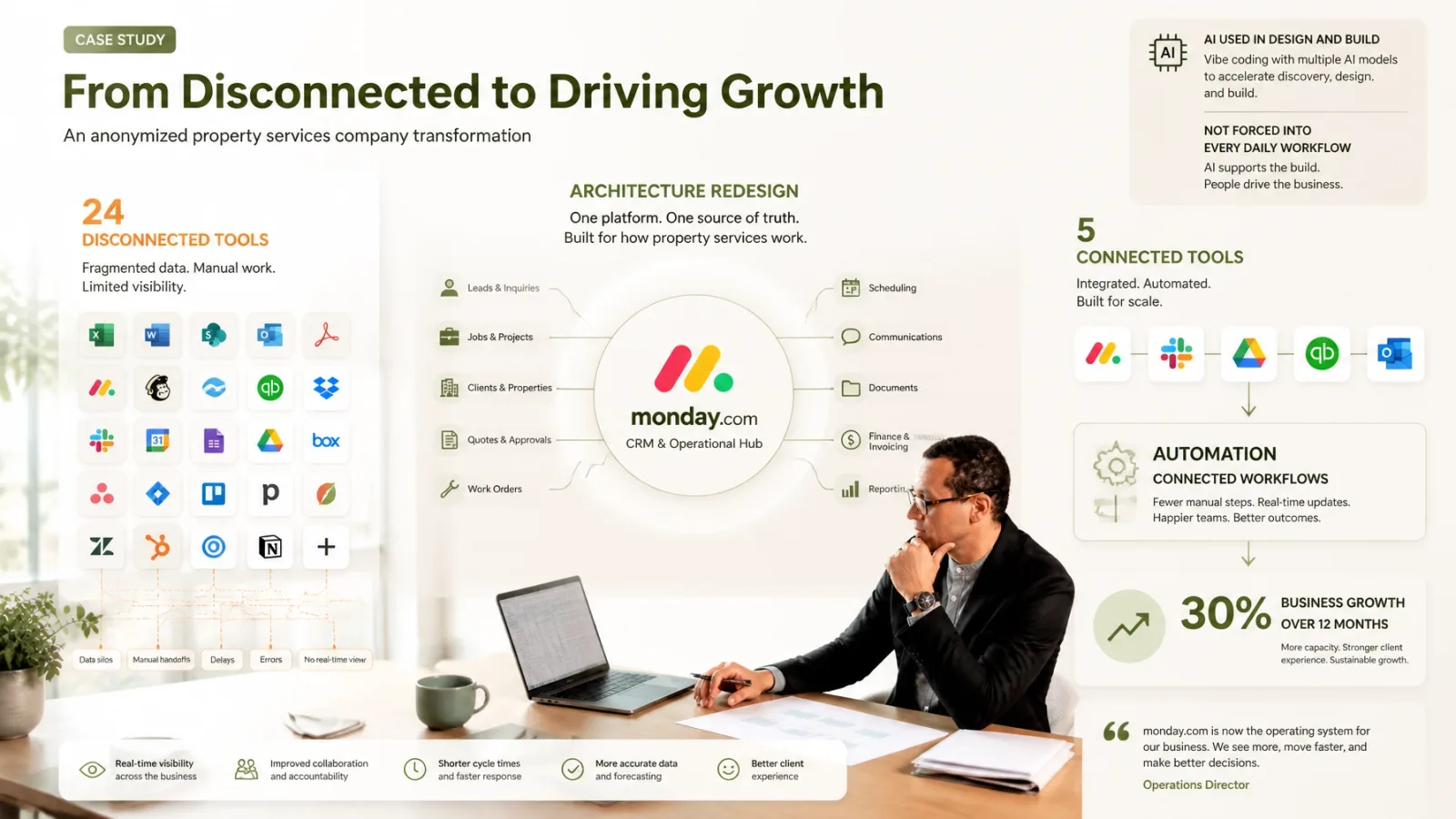
The business was running on 24 different tools. That can look like a software problem from the outside. It usually is not. In this case, the issue was architectural. The problem was not that one more automation was missing. The problem was that the operating and system architecture needed to be redesigned so the work could move clearly.
So that is where I started. Rather than simply automating what already existed, I redesigned how the work should move across the business and how the system architecture should support it. The result was consolidation from 24 tools to 5, with Monday becoming the central CRM and operational hub. From there, automation connected the workflows that had previously been manual.
An important nuance here is how AI was actually used. The goal was not necessarily to put AI tools into the flow for the sake of saying the business used AI. I used vibe coding and multiple AI models in the building process itself to design, configure, and build the right solution. This is what I mean by AI-first. AI shaped how I designed and built the solution, and where AI stayed out of the daily flow, that was the right call. The resulting system does include AI where it genuinely matters, but the goal was never to end up with a system that simply advertises “we use AI.” AI was part of the solution where it added real value, not a badge.
The measurable result was 30% business growth over the 12 months after the transformation.
That is the difference between automation alone and architecture redesign. Automation on top of 24 disconnected tools would only have moved the same confusion around faster. Redesign made it possible for the business to work as one system first, and then automate from a stronger foundation.
The deeper point: systems either return capacity or reinforce confusion
This is where the broader Three-Layer perspective matters, briefly and practically.
Founder decisions shape business strategy and operating choices. Those choices shape workflows, data, and systems. Those systems then either return capacity or reinforce confusion.
That is why I connect the founder level, the business level, and the systems level, even when the visible problem looks like CRM mess, reporting drag, or an AI project that is not delivering. The work starts with the leader even when the visible problem is spreadsheet chaos. The areas below are only as clear as the decisions above them.
Most people stop at one layer. The problem rarely lives in only one.
The answer is not more software. It is a business that has decided how it should work, then built the systems, automations, and AI workflows to support that decision.
You do not need a perfect tech stack map before you begin.
You need a clearer view of what the business is asking its systems to carry.
Need help making the business work better?
If you are trying to work out whether your next move is a strategic decision, a workflow redesign, a data cleanup, a systems change, or a practical automation build,contact me. I can help you see where the real constraint sits across the leader, business, and systems layers, then decide what the business needs to carry less of, what needs to work differently, and where technology or AI can genuinely help. The answer is not always another tool. Sometimes it is a clearer decision, a simpler process, or a better-designed system. If this is where your business is right now, get in touch and we can look at it together.